Adobe Photoshop For Photographers Hands-On Intensive
What You'll Learn
Master quick and efficient RAW photo processing with Adobe Photoshop for consistently professional results. If you want to go beyond Photoshop basics, this class will teach you more of the program's in-depth workflow features for digital photographers.
This course takes you step-by-step through the instructor's tried and true photo-processing workflow using Camera RAW. You'll use this in conjunction with Adobe Photoshop and Bridge to take your photographs to the next level and shave hours off your processing time. After addressing this process, we'll then hit some photo-adjustment techniques, masking and layers. You'll go home with a solid workflow plan and an understanding how to get the most out of Photoshop for photography.
This class will go over:
- Bridge / Camera Raw / Photoshop workflow with emphasis on simplified photo processing in Camera Raw
- What Raw photos are, and why it makes sense to shoot Raw
- Importing photos from your digital camera the smart way
- Using Adobe Camera Raw to efficiently adjust Raw photos and JPEGs
- How and why to use Smart Objects in your photo workflow
- The best techniques for correcting your photos in Photoshop
- Non-destructive editing using Adjustment Layers
- Fine-tuning your photo editing with masks
- Working with editable Smart Filters
- Master sharpening
Presented in Adobe Creative Cloud, but most of what is taught will apply to earlier versions of the program.
Who Should Take This
Amateur and professional photographers with a basic understanding of the Photoshop interface, Layers, and selections. You should take Getting Started with Adobe Photoshop first if you need those essentials.
Presented By Steve Gandy
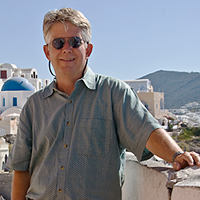
Steve Gandy is an educator, trainer, technology support professional and life-long photographer. Steve has introduced the ins-and-outs of digital photography to students young and old since 1995 and has been involved in education since 1978. His photography is varied but he focuses on nature, travel, and sports. Steve has contributed to training books and websites on Photoshop Elements, StarOffice/OpenOffice and other educational topics. He leads photographic tours to the southern Utah canyon lands.
BDA Members
Non-Members
Registration:
BDA Members: $179.00
Non-Members: $199.00
Available Dates
Sorry, we don't have this event scheduled right now but we'll probably be adding it again soon! If you're interested in this event, we recommend using our follow feature to be notified the next time we add it to our schedule. You can also email us to request that we add it soon.