
Adobe Photoshop Hands-On
What You'll Learn
Create stunning, layered compositions like a seasoned professional with Adobe Photoshop, a must-have for your digital design toolkit! Photoshop is the industry standard for color correcting and manipulating photos, crafting marketing materials such as posters and flyers, and producing digital graphics for print, web or videos!
This in-depth but user-friendly class delivers hands-on exercises that teach you Photoshop's core concepts and features. As the day progresses, you'll learn powerful techniques for non-destructive editing while generating different types of layered compositions.
This class will cover:
- Creating a composite work of art using the tools available in Photoshop.
- The difference between vector and raster graphics.
- Extracting objects from a background while learning the advantages of the different selection methods.
- Learn the mistakes everyone makes and how to easily escape them.
- Using adjustment layers, masks and layer styles to make non-destructive edits.
- Learning how to use the program to manipulate type and layout graphics.
- Best practices to help make working and editing in Photoshop easy and fun.
- In depth use of layers employing opacity, smart filters and blending modes.
- Focus your knowledge of Photoshop's interface and tools towards what you will need the most.
- How to output your work in the best file formats and optimal sizes to fit your projects needs.
What to Expect
- This is a beginner-level, hands-on course that is perfect for those looking to get started with Adobe Photoshop, those that need a refresher, or people that want to learn to work more efficiently in the program.
- As Photoshop is a broad program, this class is *not* designed specifically to address the needs of photographers, though the instructor will touch on many tools a photographer would use. This class is designed for a wider audience who needs to use Photoshop for a variety of production tasks. Many of the in-class examples are presented from this multi-use angle. However, the instructor does wish to make clear that *all* tools/processes presented can also be used for photography, web, and other purposes, not simply for the uses/techniques with which they are presented.
- BDA *does* host an Adobe Photoshop class JUST for photographers that you can learn more about and register for here.
Computer Requirement
This is a hands-on class where you'll "learn by doing" - therefore you'll need a computer (Mac or PC). If you need any particular software installed, that will be detailed below. Not all programs require special software so if there isn't any detailed listed below you will only need a computer with an up-to-date web browser.
Adobe Creative Cloud
This class will be presented from the latest version of the Adobe Creative Cloud. If you are using your own computer for the class, it is important that you have the latest version installed! Adobe offers a free 7-day trial of the Creative Cloud.
Presented in Adobe Creative Cloud, but most of what is taught will apply to earlier versions of the program.
Who Should Take This
Anyone who wants to deal with pixel-based graphics more efficiently, or learn how to work non-destructively on various graphic design projects. You should learn Photoshop if you want to manipulate digital photographs, create marketing materials, digital illustrations or use special effects in your own designs. This class is *not* specific towards just photographers, but is open to any digital artist looking to utilize Photoshop's powerful and multi-functional tools.
Presented By Gretchen Troop
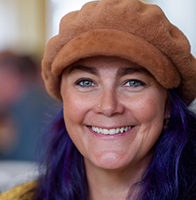
Gretchen's primary business is Gretchen Troop Photography, a wedding/portraiture/landscape/music photography business based in Boulder. In addition she runs a successful digital graphic design business, GT Digital Studio, specializing in Photoshop design, video production, animation, UI/UX, HTML and WordPress. Gretchen has been a successful landscape photographer since the introduction of digital cameras (although she studied film in college as well). Gretchen Troop Photography combines her passion for the landscape with her skills in photographing people, founded on her Bachelors of Science degree in Photography from Syracuse University. Gretchen is also a passionate teacher who brings both her deep knowledge and a fun interactive approach which helps her students retain what they learn.
BDA Members
Non-Members
Registration:
BDA Members: $175.00
Non-Members: $195.00
Available Dates
Sorry, we don't have this event scheduled right now but we'll probably be adding it again soon! If you're interested in this event, we recommend using our follow feature to be notified the next time we add it to our schedule. You can also email us to request that we add it soon.
Customer Comments
It covered many skills that I did not know existed — the shortcuts are helpful.Shingo SeanRead All Comments